Custom ERP vs Off-the-Shelf ERP: Cost, Pros & Cons
Choosing an ERP is one of the biggest technology decisions a growing business makes. It touches finance, inventory, sales, purchasing, HR, and reporting, so getting it wrong is expensive and painful to undo.
The first big question is simple: should you buy an off-the-shelf ERP like Odoo, Microsoft Dynamics 365 Business Central, or NetSuite, or build a custom ERP designed around your exact processes?
This guide compares custom ERP vs off-the-shelf ERP on real 2026 costs, a 5-year total cost of ownership (TCO), pros and cons, and regional needs in India, the USA, the UK, Europe, and the Middle East, so you can make the right call with confidence.
💡 Key Takeaway:
Off-the-shelf ERP is usually cheaper and faster for small teams with standard processes. Custom ERP typically costs $40,000–$250,000+ upfront but has no per-user license fees, fits your workflows exactly, and often has a lower 5-year cost once you pass roughly 30–50 users or need heavy customization.
What Is the Difference Between Custom ERP and Off-the-Shelf ERP?
Off-the-shelf ERP is ready-made software sold by a vendor, usually as a monthly subscription per user. You configure it to fit your business and pay extra for implementation, add-ons, and customization. Examples include Odoo, Microsoft Dynamics 365 Business Central, Oracle NetSuite, and SAP Business One.
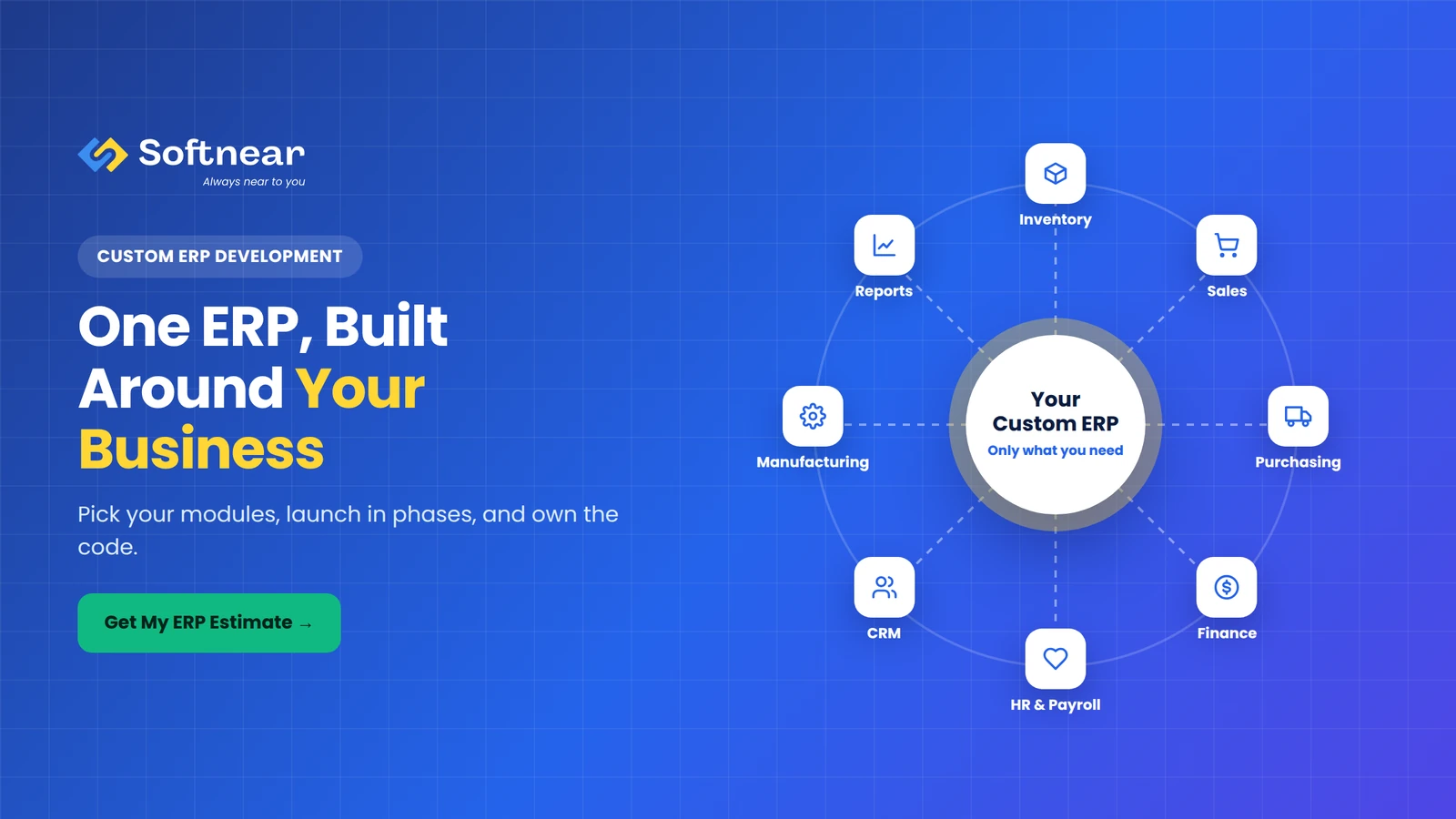
Custom ERP is built specifically for your company. A development partner designs the modules, workflows, reports, and integrations around how you actually operate. You own the software, and there are no per-user license fees.
There's also a popular middle path: a hybrid approach, where you use an off-the-shelf ERP for standard functions like accounting and build custom modules or integrations for the parts that make your business unique.
Custom ERP vs Off-the-Shelf ERP: Quick Comparison
| Factor | Off-the-Shelf ERP | Custom ERP |
|---|---|---|
| Upfront cost | Low to medium (implementation fees) | Higher (development cost) |
| Ongoing cost | Per-user subscription that grows with your team | Hosting and maintenance; no license fees |
| Time to launch | 1–6 months | 4–12 months (phased) |
| Fit with your processes | You adapt to the software | Software adapts to you |
| Customization | Limited; heavy changes are costly and can break upgrades | Unlimited |
| Ownership | Vendor owns the software; you rent access | You own the code and data |
| Vendor lock-in | High | Low |
| Best for | Small to mid-size teams with standard processes | Unique workflows, growing user counts, complex integrations |
Build or Buy? Get an Expert Opinion
Share your processes, user count, and systems. Softnear's ERP team will tell you honestly whether custom, off-the-shelf, or hybrid fits you best.
Off-the-Shelf ERP Cost in 2026
Off-the-shelf ERP pricing has two parts: licenses (paid every month or year) and implementation (a one-time cost for setup, data migration, configuration, and training). Here are typical 2026 list prices for popular systems:
| ERP | Typical License Cost | Typical Implementation Cost |
|---|---|---|
| Odoo | Standard plan around $25–$31 per user/month; Custom plan around $49–$61 per user/month (annual billing, US list prices) | $5,000 for a simple setup to $200,000+ for enterprise; mid-size projects often $20,000–$75,000 |
| Microsoft Dynamics 365 Business Central | Essentials $80, Premium $110 per user/month; Team Members $8 per user/month | Often more than the first-year license cost; varies widely by scope |
| Oracle NetSuite | Around $999/month base platform fee plus $99–$199 per full user/month | $25,000–$750,000; mid-market projects often $75,000–$250,000 |
Prices are public list prices as reported in 2026. They vary by country, plan, and negotiated discounts, and promotional rates often rise at renewal.
Don't forget the hidden costs: paid add-ons and third-party apps, partner support contracts, extra storage, upgrade testing, and the cost of customizations that must be reworked after vendor updates.
Custom ERP Development Cost in 2026
Custom ERP development cost depends mainly on the number of modules, the complexity of your workflows, integrations, and where your development team is based.
| Custom ERP Scope | Typical Modules | Typical Cost (USD) | Timeline |
|---|---|---|---|
| Basic ERP | 3–5 modules: inventory, sales, purchasing, basic accounting, reports | $40,000–$80,000 | 4–6 months |
| Mid-size ERP | 6–10 modules: plus HR/payroll, CRM, manufacturing or projects, dashboards, integrations | $80,000–$200,000 | 6–10 months |
| Enterprise ERP | 10+ modules, multi-company, multi-country, advanced analytics, mobile apps | $200,000–$500,000+ | 9–18 months (phased) |
ERP Development Cost by Region
Here's how typical rates compare for a mid-size custom ERP project of roughly 1,500 development hours:
| Region | Typical Hourly Rate | Mid-Size ERP (≈1,500 hrs) |
|---|---|---|
| India | $25–$50 | $37,500–$75,000 |
| Middle East (UAE, Saudi Arabia) | $50–$120 | $75,000–$180,000 |
| Eastern Europe | $40–$80 | $60,000–$120,000 |
| UK / Western Europe | $80–$160 | $120,000–$240,000 |
| USA | $120–$220 | $180,000–$330,000 |
Typical market estimates; actual costs depend on scope and team experience. This is why many companies in the USA, UK, Europe, and the Middle East work with a custom ERP software development company in India. If you're considering that route, see our guide on how to hire dedicated developers in India.
5-Year Total Cost of Ownership: Two Examples
The upfront price alone can be misleading. What matters is the total cost over 5 years. Here are two simplified examples.
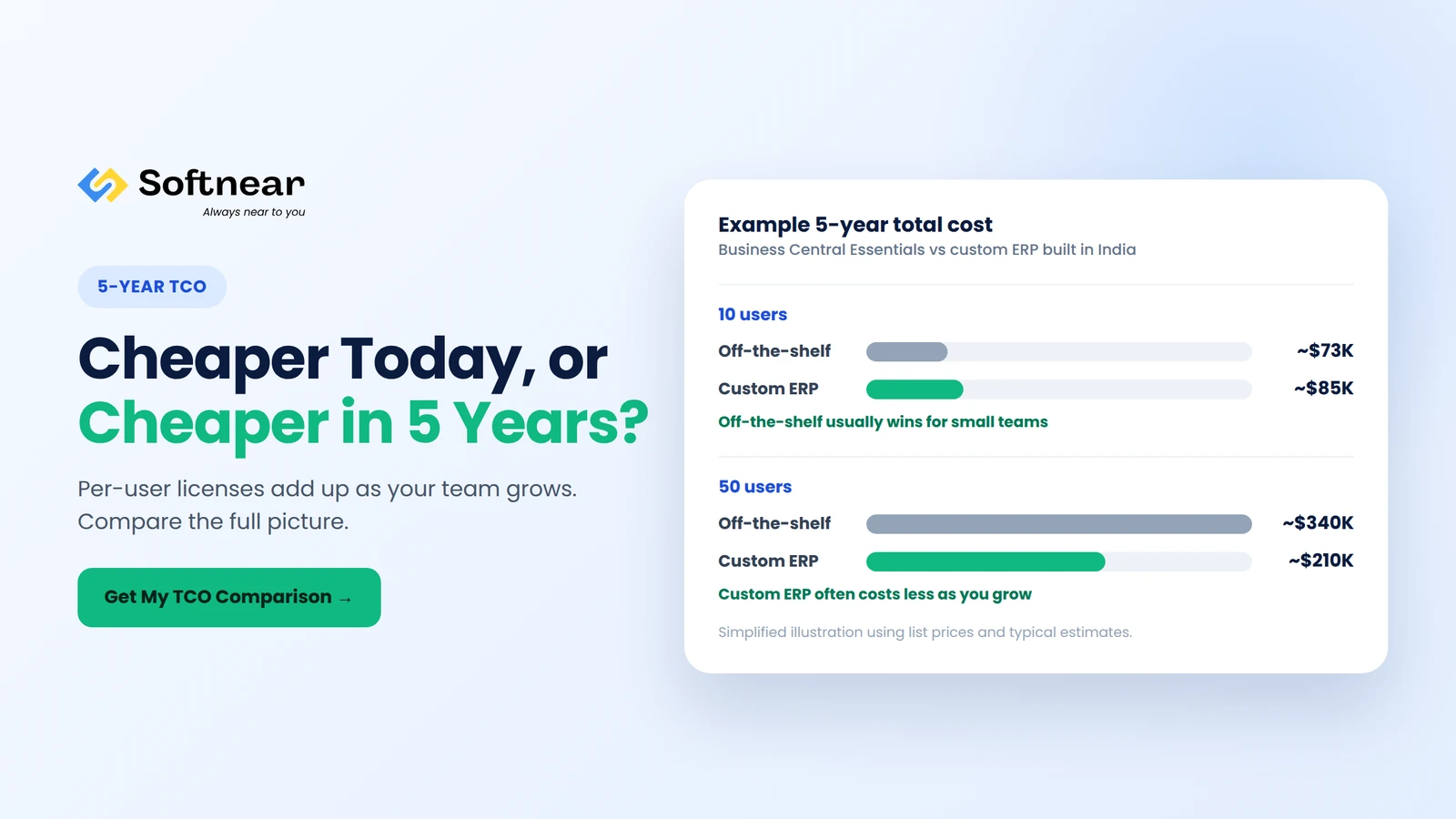
Example 1: Small Team (10 Users)
- Off-the-shelf (Business Central Essentials): 10 users × $80 × 60 months = $48,000 in licenses + about $25,000 implementation = about $73,000
- Custom ERP (basic, built with an Indian team): about $45,000 build + about $8,000/year for hosting and maintenance = about $85,000
Result: off-the-shelf is usually the better value for small teams with standard processes.
Example 2: Growing Business (50 Users)
- Off-the-shelf (Business Central Essentials): 50 users × $80 × 60 months = $240,000 in licenses + about $60,000 implementation + about $40,000 customization = about $340,000
- Custom ERP (mid-size, built with an Indian team): about $90,000 build + about $24,000/year for hosting and maintenance = about $210,000
Result: as your user count grows, custom ERP often becomes the lower-cost option, and you own the system.
These are simplified illustrations using list prices and typical estimates. Your numbers will depend on your plan, discounts, modules, and scope.
💡 Key Takeaway:
Per-user licenses are cheap at 10 users and expensive at 100. Always compare 5-year total cost, not the first-year price, before you decide whether to build or buy your ERP.
See Your Real 5-Year ERP Cost
Tell us your user count and modules. We'll compare custom vs off-the-shelf costs side by side for your business.
Pros and Cons of Off-the-Shelf ERP
Pros
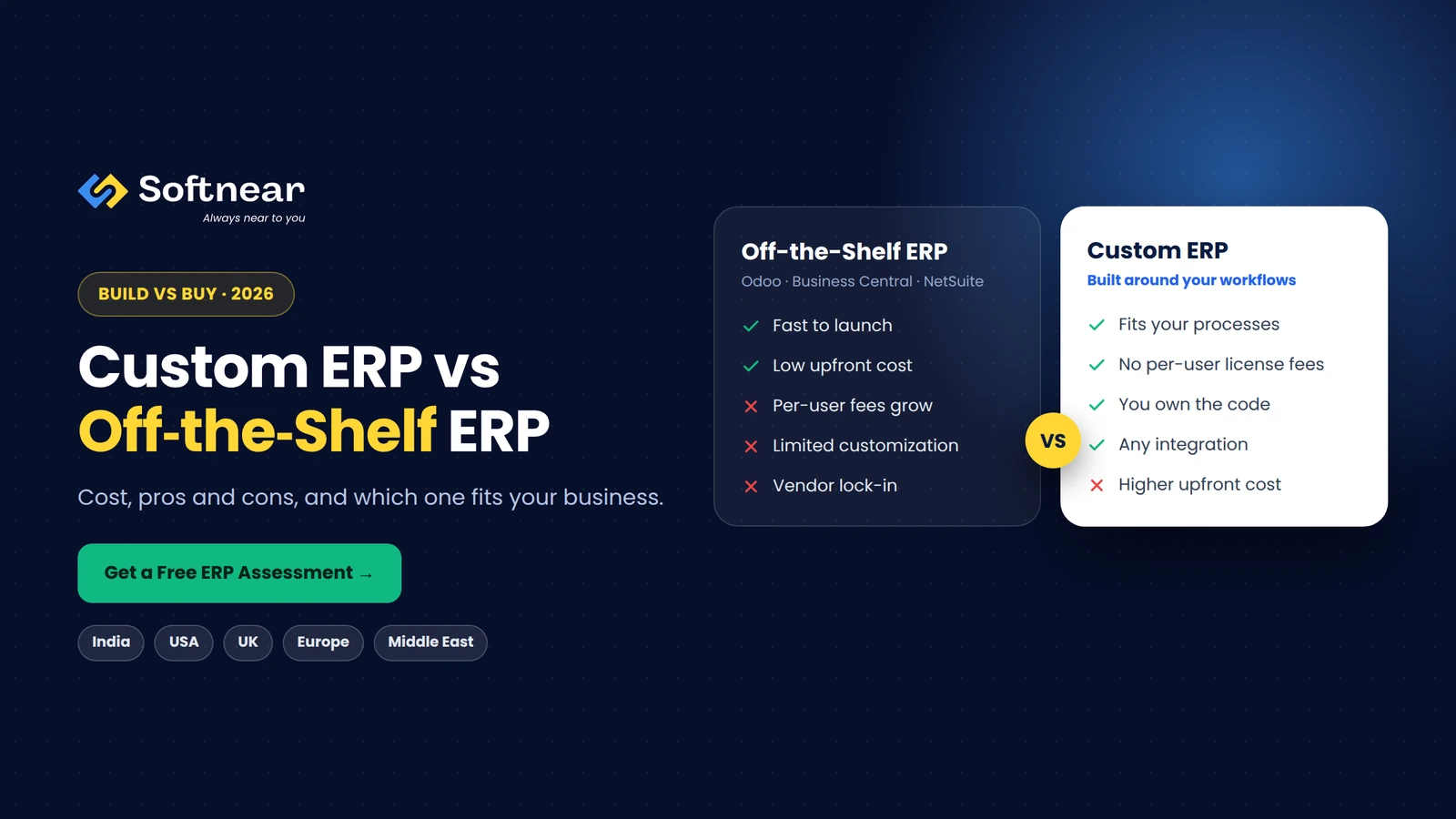
- Faster to launch: core modules are ready on day one.
- Lower upfront cost: especially for small teams.
- Proven features: standard accounting, inventory, and reporting are well tested.
- Vendor updates: new features and security patches are included.
- Large partner ecosystem: many consultants and add-ons are available.
Cons
- License costs grow with users: every new employee adds to your monthly bill.
- You adapt to the software: unique workflows often need workarounds.
- Customization limits: heavy changes are expensive and can break during upgrades.
- Feature bloat: you pay for modules and complexity you may never use.
- Vendor lock-in: price increases and roadmap changes are out of your control.
Pros and Cons of Custom ERP
Pros
- Built around your processes: the system matches how your team actually works.
- No per-user license fees: add users without increasing software costs.
- Full ownership: you own the code, data, and roadmap.
- Seamless integrations: connect any system, including legacy tools, marketplaces, and IoT devices.
- Competitive advantage: unique workflows become a strength instead of a limitation.
- Lean and fast: only the features you need, so it's easier for staff to learn.
Cons
- Higher upfront investment: development costs come before results.
- Longer timeline: typically 4–12 months, usually delivered in phases.
- Depends on your partner: quality, documentation, and support matter a lot.
- You plan the roadmap: new features are added when you decide, not automatically.
When to Choose Off-the-Shelf vs Custom ERP
| Choose Off-the-Shelf ERP If… | Choose Custom ERP If… |
|---|---|
| You have fewer than 20–30 users | You have 30–50+ users, or expect fast growth |
| Your processes are fairly standard | Your workflows are unique and give you an edge |
| You need to go live within weeks | You can launch in phases over several months |
| You have a limited upfront budget | You want to avoid rising per-user license fees |
| Built-in features cover 80%+ of your needs | You need deep integrations with many systems |
The Hybrid Option
Many businesses get the best of both by using an off-the-shelf ERP for standard functions and adding custom modules, integrations, or a custom front end for their unique processes. This keeps launch time short while removing the biggest limitations.
Odoo vs Custom ERP and Business Central vs Custom ERP
Odoo vs Custom ERP
Odoo is flexible and affordable for small and mid-size businesses, with many ready-made apps. It's a strong choice when your needs fit its modules. A custom ERP makes more sense when you'd need many custom Odoo modules anyway, when you want to avoid per-user subscriptions as you scale, or when you need full control over the code and hosting.
Business Central vs Custom ERP
Business Central is a solid choice for companies already using Microsoft 365 and needing strong financials. A custom ERP is often better when your operations go beyond standard finance and inventory, such as complex manufacturing, field services, multi-vendor marketplaces, or industry-specific workflows, or when license costs for a large team become hard to justify.
Regional Requirements: India, USA, UK, Europe & Middle East
Whichever route you choose, your ERP must support the rules and realities of the markets you operate in:
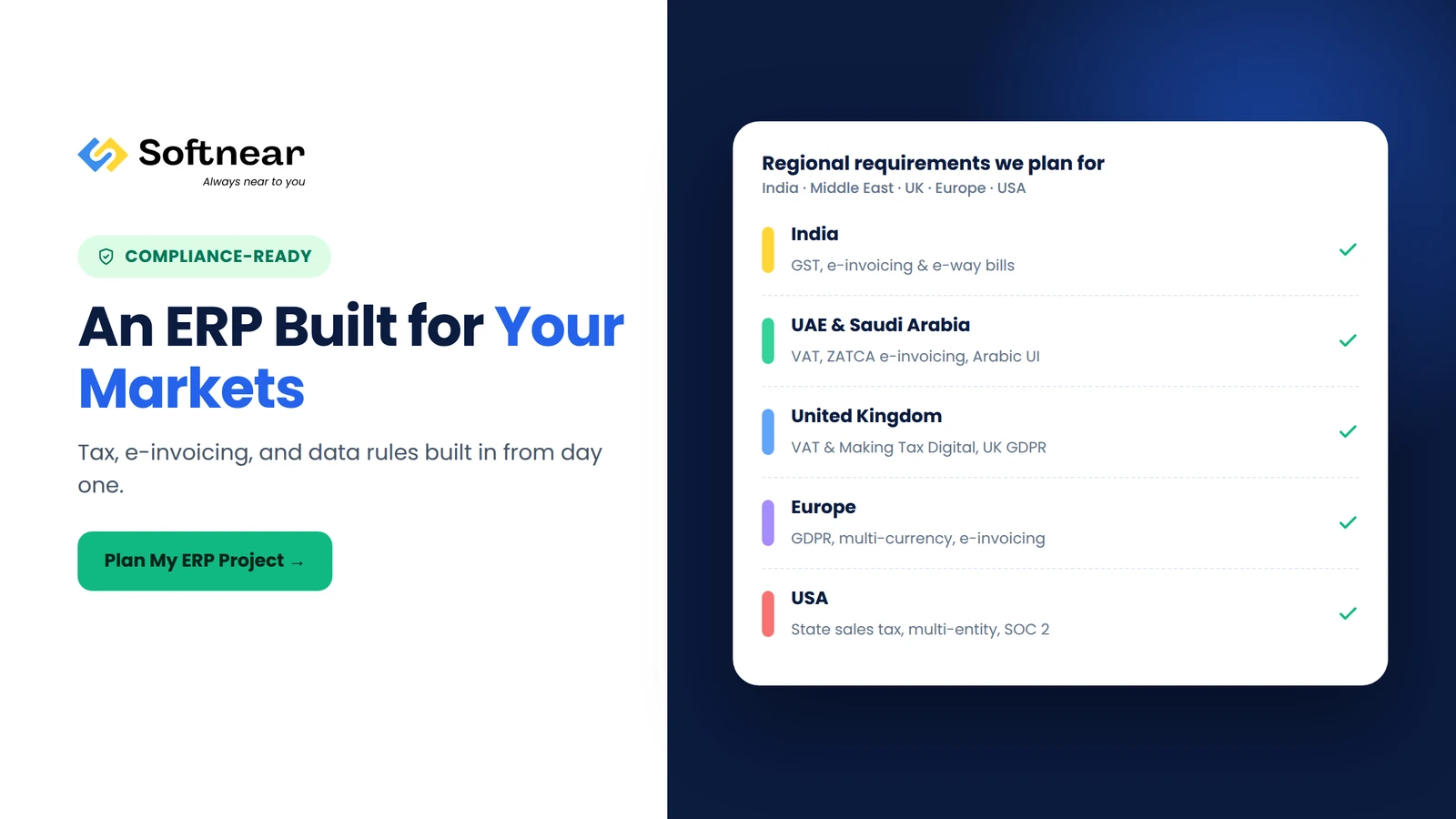
- India: GST compliance, e-invoicing and e-way bills, TDS, multi-state tax handling, and support for regional languages.
- USA: state-by-state sales tax, multi-entity accounting, and security expectations such as SOC 2 for vendors.
- UK: VAT and Making Tax Digital (MTD) compatibility, plus UK GDPR for personal data.
- Europe: GDPR, multi-currency and multi-language support, and growing e-invoicing requirements in many EU countries.
- Middle East: UAE and Saudi VAT, Saudi Arabia's ZATCA e-invoicing (FATOORA), Arabic and right-to-left interfaces, and data residency preferences.
Off-the-shelf systems often cover these through local partners or add-ons, sometimes at extra cost. A custom ERP can build them in from day one, designed for exactly the countries you operate in.
The Custom ERP Development Process
- Discovery and process mapping (2–4 weeks): document your workflows, pain points, and must-have modules.
- Architecture and UI/UX design (2–6 weeks): data model, integrations, user roles, and screen designs.
- Phase 1 development (2–4 months): core modules such as inventory, sales, and purchasing.
- Data migration and testing: move data from spreadsheets or legacy systems and test with real users.
- Go-live and training: launch Phase 1 and train your team.
- Next phases: add HR, manufacturing, analytics, mobile apps, and more, based on real usage.
How Much Would Your Custom ERP Cost?
List the modules you need and we'll send a phased plan with a clear cost and timeline for each stage.
How to Choose a Custom ERP Software Development Company
- ERP experience: ask for examples of ERP, CRM, inventory, or accounting systems they have built.
- Business understanding: they should ask about your processes before talking about technology.
- Phased delivery: look for a plan that delivers working modules early, not one big launch at the end.
- Compliance knowledge: they should understand tax and data rules in your countries.
- Code ownership and documentation: you should own the source code and receive full documentation.
- Long-term support: clear maintenance plans and response times after launch.
Why Softnear Technologies for ERP Development
Softnear Technologies builds custom ERP, CRM, HRM, accounting, and inventory systems for businesses in India, the USA, the UK, Europe, and the Middle East. We also extend and integrate off-the-shelf systems when that's the smarter choice.
- Honest build vs buy advice: we recommend what fits your business and budget.
- Phased delivery: start with core modules and see value early.
- Built for your markets: GST, VAT, e-invoicing, multi-currency, and Arabic support where needed.
- Weekly visibility: progress reports from real ticket data in your tools.
- You own it: full source code and documentation are yours.
Frequently Asked Questions
Answers to the questions businesses ask most about custom ERP vs off-the-shelf ERP.
Is custom ERP better than off-the-shelf ERP?
Neither is better for everyone. Off-the-shelf ERP is usually better for small teams with standard processes and limited budgets. Custom ERP is better for growing businesses with unique workflows, many users, or complex integrations, because it fits exactly and has no per-user license fees.
How much does custom ERP development cost?
In 2026, a basic custom ERP typically costs $40,000–$80,000, a mid-size ERP $80,000–$200,000, and an enterprise ERP $200,000–$500,000 or more. Costs are usually lower when you work with an experienced development team in India.
How much does off-the-shelf ERP cost?
Off-the-shelf ERP usually costs a monthly fee per user, from around $25–$60 per user for Odoo to $80–$110 for Business Central, and more for NetSuite, plus one-time implementation costs that range from a few thousand dollars to several hundred thousand.
How long does it take to build a custom ERP?
A basic custom ERP typically takes 4–6 months, a mid-size ERP 6–10 months, and an enterprise ERP 9–18 months. Most projects launch core modules first and add more in phases.
Should I choose Odoo or a custom ERP?
Choose Odoo if its standard apps cover most of your needs and your team is relatively small. Choose a custom ERP if you'd need heavy Odoo customization, expect your user count to grow significantly, or want full ownership of your system.
Can a custom ERP integrate with my existing tools?
Yes. A custom ERP can connect with accounting software, eCommerce platforms, CRMs, payment gateways, marketplaces, banks, and legacy systems through APIs, so data flows automatically between them.
Make the Right ERP Decision for Your Business
The custom ERP vs off-the-shelf ERP decision comes down to your processes, team size, growth plans, and 5-year budget. Off-the-shelf ERP wins on speed and low upfront cost for smaller teams. Custom ERP wins on fit, ownership, and long-term cost as you grow. For many businesses, a hybrid approach is the smartest path.
Softnear Technologies helps companies in India, the USA, the UK, Europe, and the Middle East choose, build, and integrate the right ERP, with transparent pricing and phased delivery.
Ready to Plan Your ERP?
Talk to Softnear's ERP specialists about your processes, users, and budget. Get a clear build vs buy recommendation and cost estimate.
